


Donna AI Song & Music Maker
4.711.50K Reviews
App Specs
- Version
- 1.0.98
- Updated On
- License
- Free
- Downloads
- 10,000,000+
- Developer
- MOBIVERSITE YAZILIM BILISIM REKLAM VE DANISMANLIK
- Categories
- Music & Audio
- Platform
- Android, iOS
Screenshots
 Analysis by AppCompare
I’d approach Donna AI as a quick way to explore musical ideas on a phone, not as a shortcut to a finished, release-ready production. That distinction matters: AI-generated music can be useful when I need a starting point, a mood, or something playful to build on, while a dedicated recording setup gives me more deliberate control. If you’re curious about making songs but don’t want to begin with a complicated desktop workstation, Donna AI Song & Music Maker is an approachable place to experiment.
How quickly can you get from idea to sound?
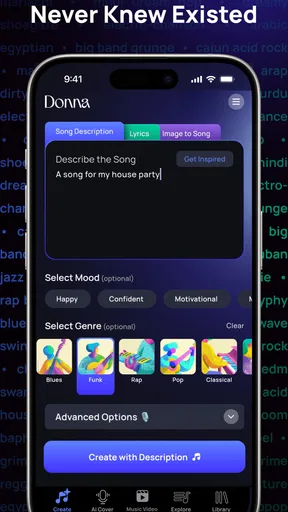
The appeal is the short distance between having a vague idea and trying it as music. I can open a creator app like this with a small prompt in mind—perhaps a style, a feeling, or a rough lyrical direction—and see what the generator gives me. That makes it useful for testing possibilities during a spare moment rather than planning a full recording session. I’d still leave room for iteration: the first output is better treated as a sketch than as a definitive version of the song in my head.
For a practical workflow, I’d start with one clear creative aim instead of asking for everything at once. If I want a backing idea for a short video, I’d focus on the mood and genre; if I’m trying to get past a blank page, I’d explore a broader musical direction. Keeping each attempt focused makes it easier to judge what works and what I’d change. This is one of the more useful trade-offs of AI creation: fast inspiration, but less certainty that the first result will match a very specific arrangement or performance.
When creative play turns into a heavier session
A casual trial and a longer session are different kinds of use. Trying a few ideas can feel light and spontaneous, while repeatedly generating, listening, recording vocals, and comparing versions asks more of both the person and the device. I wouldn’t assume that every phone handles an extended music session in exactly the same way. If the app seems slower or the phone gets warm, I’d pause, close other demanding apps, and return to the project rather than pushing through a frustrating stretch.
There’s also a creative cost to endless variation. When I keep asking for alternatives without deciding what I like, I can end up with many fragments and no finished idea. A helpful habit is to save or export the strongest direction before exploring another one, then note what made it work: the energy, the genre, or the vocal feel. That turns experimentation into a small, repeatable process instead of a stream of forgettable results.
Reliability, revisions, and keeping expectations sensible
For me, reliability in a music-making app is not just about whether it opens; it’s also about whether I can make progress without losing track of the version I prefer. I’d treat each promising generation as a separate creative option and keep an exported copy of anything I especially like. That’s a sensible precaution whenever a project matters, and it also makes sharing simpler if I want feedback outside the app.
The app’s developer is MOBIVERSITE YAZILIM BILISIM REKLAM VE DANISMANLIK. Donna AI is free to download, with in-app purchases ranging from $0.99 to $79.99 per item, so I’d check the purchase details before committing to paid options. The app has a 4.6 average from around 327,000 ratings, and more than five million installs. Those figures suggest it has found a broad audience, but they don’t tell me whether its particular sound or workflow will suit my own taste. I’d use the free entry point to decide that for myself.
Worth Reading Before You Choose

Baby Panda World Brings Quick Play to Modern Phones, but Its Game Library Feels Busy

ESPN’s Live Game View Makes Following Close Games Easier

QuizzLand Review: A Good Fit for Short Trivia Breaks, Not Every Player

Basketball Stars: Multiplayer Is Fast, but Can It Recover When Matches Go Wrong?

WEBTOON Turns Phone Updates Into a Better Reading Routine

Link to Windows Runs on Shared Habits, Not Social Feeds
Who benefits most—and when another tool makes more sense
I can see Donna AI working well for a beginner who wants to hear how a musical idea might sound, a songwriter looking for a prompt to escape a blank page, or a casual creator who needs a quick track concept for a personal project. It can also be a fun way to compare genres and moods before choosing a direction. For someone who wants to record and shape every instrument, edit detailed arrangements, or make precise production decisions, a traditional digital audio workstation is likely a better fit. The difference is control: a generator helps me explore, while a full production tool is built for hands-on editing.
It’s also worth separating inspiration from ownership of a finished artistic identity. A generated backing can give me something to react to, but it won’t automatically express the exact phrasing, performance, or emotional detail I would create myself. If I’m making something personal, I’d use the app’s output as a draft, add my own vocal or creative choices where appropriate, and listen critically before sharing it. For professional work with exact technical requirements, I’d choose tools designed around those requirements rather than expecting a mobile generator to replace an entire studio process.
On Android, the listed minimum operating system is 8.0, and the app is rated for Everyone. It was released on April 26, 2024, and the current version is 1.0.75. Those details help with basic compatibility decisions, but I’d still consider the age and capabilities of my particular phone: music creation is more comfortable on a device with enough free space, a decent speaker or headphones, and a battery that can handle a longer creative session. I’d listen through headphones when judging a mix, since a phone speaker can make it harder to notice balance and detail.
Hey there, music lovers! I’ve been diving into some cool apps lately, and I stumbled across Donna AI Song & Music Maker. Let me tell you, it’s a game changer for anyone looking to dabble in music creation without the hassle of complex software. Whether you’re a seasoned musician or a newbie, this app has something for everyone. So, let’s get into what makes Donna AI tick and why it might just become your new best friend in the music world.
Getting Started with Donna AI
First things first, downloading the app is a breeze. It’s available on both Android and iOS, so no one’s left out. Once you fire it up, the interface is super user-friendly. I was pleasantly surprised by how intuitive it felt. You don’t need to be a tech wizard to navigate through the options. Everything is laid out clearly, and the design is sleek, which makes the whole experience pretty enjoyable.
Features That Hit the Right Note
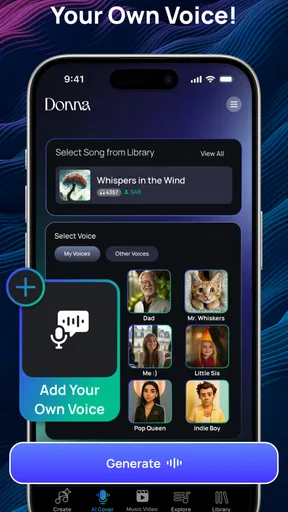
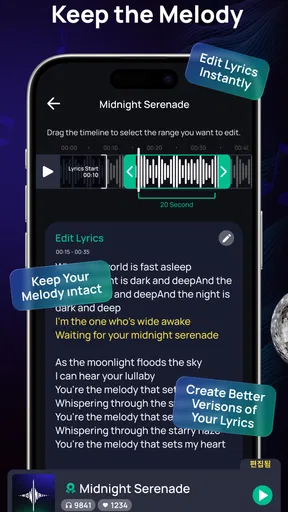
Now, onto the fun stuff! The features of Donna AI Song & Music Maker are what really caught my attention. The app offers a range of tools that cater to different aspects of music creation. Want to lay down some beats? No problem. Looking to mix and match different sounds? Easy peasy. The app even lets you record your own vocals directly, which is amazing if you’re someone who loves to experiment with lyrics and melodies.
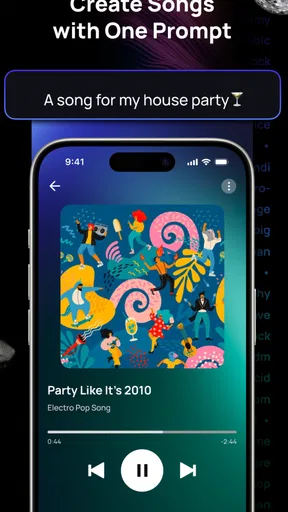
One of my favorite features is the AI-powered music generator. This nifty tool can whip up some pretty impressive tunes with just a few taps. It’s perfect for those days when you’re stuck in a creative rut and need a little inspiration. I found myself playing around with this feature for hours, and I have to say, the results were surprisingly good!
Ease of Use and Accessibility
Another highlight of this app is how accessible it is. The developers have done a fantastic job of making sure that anyone can use it, regardless of their musical background. The tutorials and help sections are clear and concise, so if you ever find yourself stuck, there’s plenty of guidance available.
Plus, the app doesn’t hog your device’s resources, which is a huge bonus. I’ve tried a few music apps that slowed my phone down to a crawl, but that’s not the case here. It runs smoothly and doesn’t crash, which is always a win in my book.
Community and Sharing
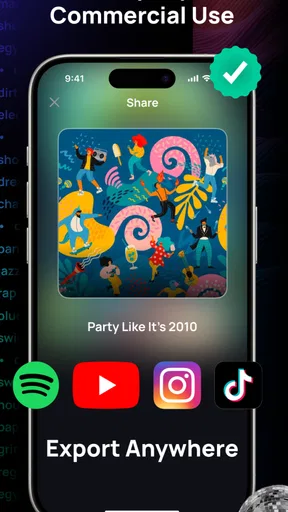
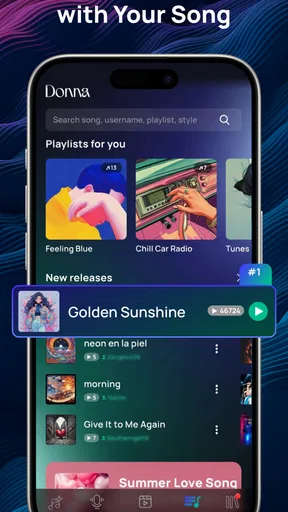
Music is all about sharing, right? Well, Donna AI Song & Music Maker makes it super easy to share your creations with the world. You can export your tracks and share them directly to social media or with friends. There’s also a community feature where you can connect with other users, exchange ideas, and even collaborate on projects. It’s a fantastic way to get feedback and improve your skills.
The Final Beat
So, what’s the verdict? In my opinion, Donna AI Song & Music Maker is a fantastic app for anyone interested in music creation. It’s packed with features that are both powerful and easy to use, making it suitable for users of all skill levels. Whether you’re looking to create the next big hit or just want to have some fun with sounds, this app has got you covered.
So, why not give it a try? You might just discover a hidden talent or, at the very least, have a bit of fun along the way. Happy creating!
Pros
- Intuitive interface for easy song creation.
- Wide variety of sound effects available.
- In-app tutorials for beginners.
- Customizable instrument options.
- Offline mode for music making.
Cons
- Limited free version features.
- Occasional app crashes reported.
- Export options can be limited.
- Requires significant storage space.
- In-app purchases can be costly.
FAQs for Donna AI Song & Music Maker
What features does Donna AI Song & Music Maker offer?
Donna AI Song & Music Maker provides a robust suite of features for music creation. Users can compose, edit, and mix music using AI-generated suggestions. It includes a variety of instruments and sound effects, allowing users to explore different genres and styles. Additionally, the app supports collaboration with other artists and seamless integration with popular music platforms.
Is Donna AI Song & Music Maker suitable for beginners?
Yes, Donna AI Song & Music Maker is designed with user-friendly features that cater to both beginners and experienced musicians. The app offers guided tutorials and AI-assisted tools that help new users understand music composition basics, making it easy to start creating music without prior experience.
Can I export my creations from Donna AI Song & Music Maker?
Absolutely. Donna AI Song & Music Maker allows users to export their compositions in various formats such as MP3, WAV, and MIDI. This flexibility ensures that your music can be easily shared across different platforms or further edited in other music production software.
What are the system requirements for Donna AI Song & Music Maker?
To run Donna AI Song & Music Maker smoothly, your device should meet the minimum system requirements. For Android, a device running version 8.0 or higher is recommended, while iOS users will need at least iOS 11. The app also requires a stable internet connection for optimal performance and access to cloud features.
Are there any subscription fees for using Donna AI Song & Music Maker?
Donna AI Song & Music Maker offers both free and premium subscription plans. The free version includes basic features, while the premium plan unlocks advanced tools, additional sound packs, and unlimited cloud storage. Users can choose monthly or annual billing options, allowing flexibility based on their needs and budget.


